
Android only · No stores
Betika app in Tanzania: Android APK, no iOS version
The Betika app for Tanzania is not listed on the Play Store and has no iPhone build: it is an Android APK downloaded directly from the operator's website, about 25 MB in size. Below is the clean install path, the errors that usually block it, and the cases where the mobile site or USSD is the smarter channel.
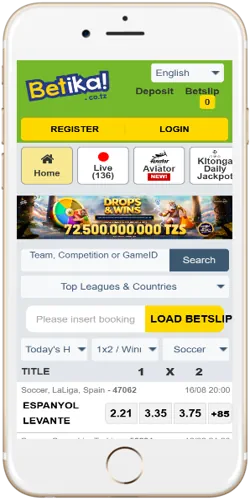
Distribution reality
What the Tanzanian Betika app actually is
In Tanzania the app installs only as an APK file from the operator's own website. The Betika listing on Google Play serves Kenya, so a search from Dar es Salaam or Dodoma either returns the Kenyan build or nothing usable for a Tanzanian account. On iPhone the position is simpler: there is no Tanzanian iOS app at all. The Betika build on Apple's App Store, listing ID 1452270250, targets Kenya, and Tanzanian players are directed to the mobile website instead.
Functionally the APK mirrors the website: the same phone-number account opens the sportsbook, the Kitonga jackpots, the casino lobby and the crash games, with no app-only products and no app-only bonuses. Installing it is a convenience decision about speed and data use, not a way to reach extra content.

Android: APK from the official site

iOS: no Tanzanian app, use the mobile site
Install walkthrough
Installing the APK without the usual errors
The whole process takes five steps, and every common failure maps to one of them:
- Open the operator's Tanzanian website in your phone browser and tap the app download link. Third-party APK mirrors are the main source of corrupted or outdated files, so the site is the only sensible source.
- When Android asks, allow installs from unknown sources for the browser you used. On Android 8 and newer this permission is granted per app, not system-wide, so enabling it once for Chrome does not cover Firefox or Opera Mini.
- Open the downloaded APK from the notification shade or the Downloads folder.
- Confirm the install prompt. The package is about 25 MB, so the download itself is quick even on a modest bundle.
- Open the app and log in with your registered phone number and password.
If Android answers with "App not installed", the cause is almost always one of three: under about 100 MB of free storage, the unknown-sources permission missing for that specific browser, or an interrupted download. Free some space, re-check the permission, delete the file and fetch it again on a stable connection. When the app installs but crashes on first open, low RAM is the usual reason: close background apps and retry, which solves most cases on entry-level handsets with 1–2 GB of memory.
Channel choice
App, mobile site or USSD: which channel fits your phone
The APK is one of three working channels, not the only correct one. A phone with 32 GB of storage that is already full, or a SIM with no data bundle, is better served by the mobile site or by USSD, and the account is identical on all three.
| Channel | Needs install | Data use | What works |
|---|---|---|---|
| Android APK | Yes: about 25 MB once, plus manual updates | Lowest per session once installed | Full sportsbook, jackpots, casino, crash games |
| Mobile site | No | Charged per page load | The same products in any modern browser, on Android or iPhone |
| USSD *149*16# | No | None: runs over GSM signalling | Registration, today's fixtures, football markets, account basics |
What the app does not change
Three limits stay no matter how well the install goes. There is no iOS build for Tanzania, so iPhone users should bookmark the mobile site rather than hunt for an app. An APK never updates itself, so version checks remain your job. And installing the app changes nothing about payouts: withdrawal requests still follow the operator's processing hours and daily caps, exactly as on the website.
Build details
Version, size and updates
As of August 2026 the current Tanzanian build is v6.2.7, released in December 2025. The download is about 25 MB and the app runs on Android 5.1 or newer, which covers the large majority of Android handsets in use across Tanzania, including entry-level models. These figures are time-bound: re-check the version note on the operator's site before treating them as current.
Because the app never passes through the Play Store, it does not auto-update. Updating means downloading the fresh APK from the website and installing it over the existing copy; your login and balance are unaffected, since the account lives on the operator's servers, not inside the app file. The installed version number is shown inside the app's menu, and comparing it with the version announced on the download page tells you whether an update is due.
Account access
Logging in on the app and fixing access errors
The app uses the same credentials as every other channel: your registered phone number and your password. One account works across the APK, the mobile site and USSD, so nothing needs to be re-created after installing.
If a correct-looking login fails, re-type the phone number exactly as it was registered, digit by digit: a missing or doubled leading zero is the most common typo. Passwords are case-sensitive, and on small screens an unnoticed capital letter from autocomplete causes a surprising share of failed attempts.
Repeated wrong passwords trigger a temporary lock as a fraud protection. The clean route out is the password-reset option on the login screen, which sends an SMS code to the registered number and lets you set a new password within a minute or two. If the number itself is lost or the account stays blocked after a reset, the support team at msaada@betika-tanzania.com handles those cases in writing.